Building with Autonomous Agents: A Very Efficient Way to Be Wrong
I've always been bullish on the ability to cut an issue and let the coding harness cook. This was a key workflow at my last job that we got working about 18 months ago: you'd cut a GitHub Issue, and a Claude Code agent (running in a sandbox on a Kubernetes cluster via Coder) would go off, attempt to solve it, and cut an associated PR.
It was great, right up until it created a new bottleneck: actually testing the code being generated. Engineers don't want to become the QA team for the AI. That's not a fun job.
That's roughly where I think things like Claude Code Web are today. It's very easy to spin up sandboxes, generate code, and have interactive sessions. But thanks to limited bootstrap abilities and the lack of a real "DevOps sandbox," there's still a ton of friction in getting past interactive mode. (And as Claude's new pricing makes clear, betting everything on a single platform won't be economical long-term either — but that's a separate fight.)
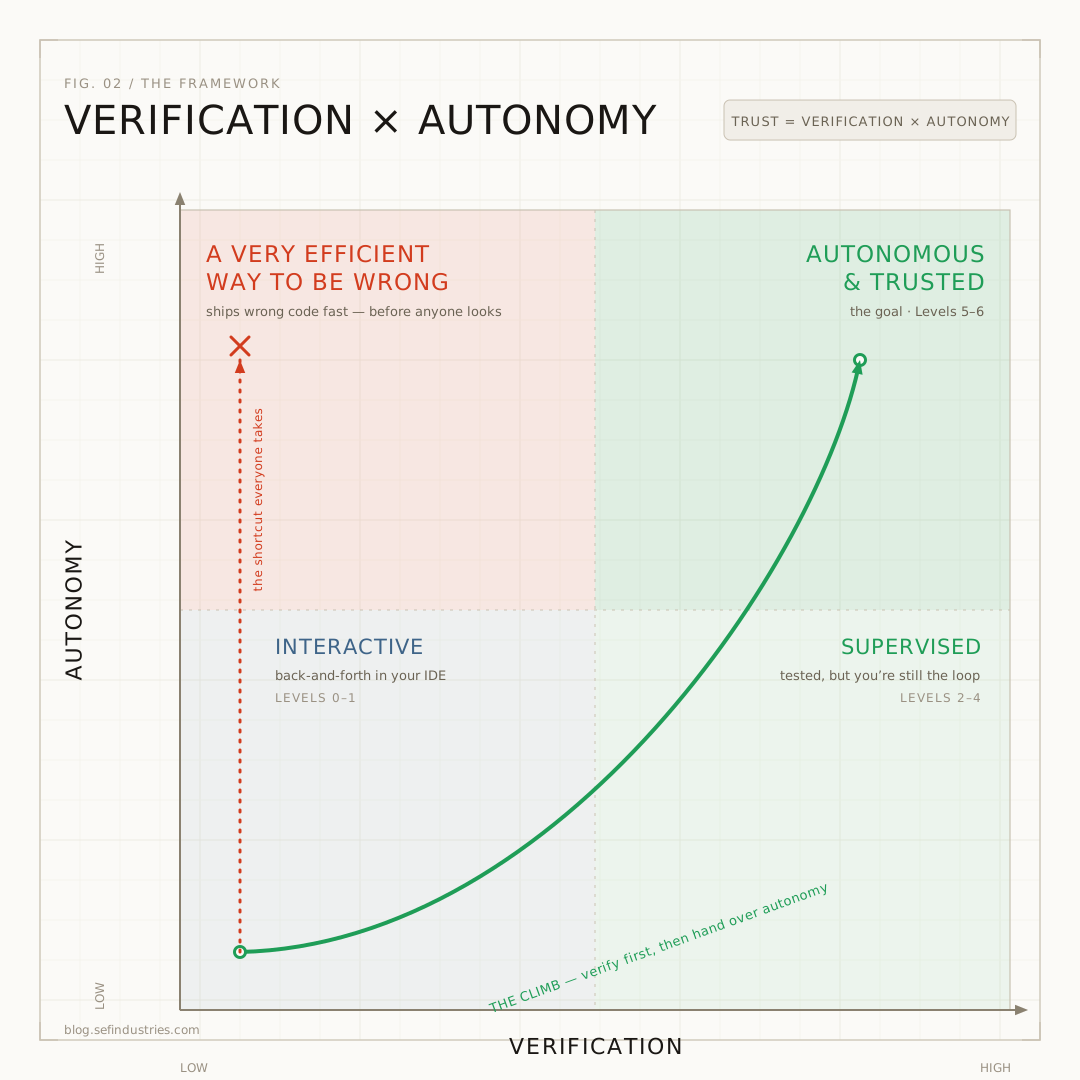
When I think about the framework for autonomous agents, specifically coding agents, it comes down to two dials, and they move independently.
The first dial is verification: can the agent find out, on its own, whether it actually worked? The second is autonomy: how much are you willing to let it do, and break, without you in the loop?
Almost everything that goes wrong on the path to autonomous coding is a mismatch between the two. Crank autonomy on weak verification and you haven't built progress, you've built a machine for shipping crappy code, faster. Congrats! You only get to ramp up autonomy once you're confident the agent can actually ship correct code, and self-correct when it gets it wrong.
I find it easiest to talk about that balance as a ladder. So here's the climb — just keep both dials in your head the whole way up.
Level 0: Coding Agents in Your IDE
This is Claude Code, GitHub Copilot, Codex running in your IDE or Terminal. This is where most developers live today.
Level 1: First-Pass Coding Agent
You cut a ticket, the coding agent does a ham-fisted job of writing the code, and you go check it out. Then you get to test the AI's shitty code, find out it doesn't work, and end up right back at Level 0, getting it working yourself.
What I've seen is you can get value here for some tasks — but developers quickly become the bottleneck because the code needs a lot of TLC to be useful for anything with any real complexity, so it ends up being a nice-to-have for quick fixes rather than a critical workflow.
The gaps at Level 1 are almost always the same: no proper per environment secrets vaults, no way to run the application end-to-end in the sandbox, no dev DB that you can manipulate for that one agent, and insufficent skills & documentation telling the agent how the app actually works.
Level 2: Coding Agent with a Dev Environment
This is where it starts to get interesting. You set the coding agent up in an environment where it can actually run the app — ideally a sandbox environment. Now it can spin up your app and (in theory) test its own changes before pushing them. That's the rapid feedback loop you need for AI to be more than a productivity tool.
At Level 2, suddenly the PRs have a real shot at working (it's amazing what happens when you actually test to see if something works right?).
There's a real risk if you stop here: you get lazy. The agent cuts a PR, you skim it and merge without actually testing it yourself, and BOOM — your app breaks. Which brings us to Level 3.
Level 3: Coding Agents with Verification Gates
Letting an agent cut PRs it believes work is great — but "believes" is doing a lot of lifting in that sentence. You'll still want it to run through a checklist before you trust it. Two ways to do that:
- Pre-commit hooks: enforce the basics locally: linting, tests, type checks. Well-built codebases already have these for the developers on the team. Now you really need them.
- Verification gates / critics: mechanical or LLM-driven gates that verify the agent did what it claims. If it didn't, the gate kicks it back to fix the errors, or restarts the process.
These verification gates allow you to specify things like "Did the agent actually spin up the application and run a smoke test that exercises the new functionality?" or "Based on the spec, did the agent build what was specified?". But don't sleep on old fashioned mechanical gates either... You can check if code coverage decreased, if the test suite is passing, etc, all without an AI loop.
Level 4: Autonomous Coding with a Human in the Loop
Now that your agents are generating useful code, you want them spinning up a full preview environment: a branched DB and a running version of the code in an ephemeral environment, so you as a human can actually click around and test it.
The point is that you shouldn't just be getting a PR anymore. You should be able to test the real workflow yourself — with the environment spun up for you automatically.
Again — this takes a serious investment in infrastructure. Secrets, heavy automation of your DevOps process, real CI. Without those, none of this works properly. Where at Level 2 or 3, you may have been able to squeak by reusing a dev environment, it won't scale up the way you need it. From what I've seen, this requirement often makes Level 3 a terminal level for organizations without a strong, existing DevOps practice.
Level 5: Autonomous Loops with Agents in the Loop
This is where I think everyone wants to be. Agents commit code, other agents respond to it, errors come up, and agents fix them automatically.
You're still generating that preview environment, but now it gets handed to an agent to verify the functionality against the spec. Only after an AI-driven QA pass do you get handed a UI to click through and confirm.
You still need human-in-the-loop gates. These could be database writes (you need permission to update prod, but reads are fine), reviewing work plans, or answering the agent's open questions about the implementation.
What you want to avoid is using those gates as a crutch for missing mechanical verification. Humans shouldn't be checking whether tests pass or whether there are errors. Humans are the gate for judgment calls — anything irreversible, anything touching money or PII, anything that can't be cleanly encoded.
Human-in-the-loop gates will inevitably become your bottlenecks, which means you have to constantly invest in improving, reducing, and removing them. Otherwise you'll just start clicking "yes" on everything and get the worst of both worlds: a fake gate you're doing busywork for.
Level 6: Events Triggering Autonomous Loops
The next unlock, once your agents can be productive on their own, is triggering them with events:
- Git events (push, merge) — automatically review new deployments and PRs.
- Errors — kick off a review whenever a new class of error shows up. This is the big one. It collapses the whole "spot the error, go check the logs, pull the logs" dance. The error itself puts an agent to work on the problem, often before you've even noticed there's an issue.
- New issues — a stakeholder files an issue, and an agent reviews it to figure out whether it has enough detail, whether it's already been implemented, and so on.
If you're not thinking about events, you're leaving humans to piece things together on the AI's behalf, or relying on unreliable cron jobs. You're giving up the biggest speed gains event-driven triggers have to offer. When agents respond in real time, you really see how fast the AI can iterate.
Does this mean everything should be handled by agents working autonomously? Absolutely not. There's still plenty of work you want a human deep in: designing UIs, scoping large features, leading major refactors. You still need to understand your codebase — how it works and how it's being built — and you don't want to outsource all your brainpower to the agents.
Finally, while you can automate execution to the moon, if the thing you asked for is wrong, you've just built a very efficient way to spend money on tokens.
This is where the humans need to be spending time. That means doing the work to understand what you actually want, then writing a ticket clear enough to get you there. Unlike a good developer — who'll stop and ask "are you sure you want it this way?" — your agents will mostly just assume you meant exactly what you said. That isn't to say it isn't worth using AI Agents to quickly build and test prototypes, but you can easily spend a lot of time building the wrong thing instead of focusing your time upfront on understanding what you're really trying to build.
If you're stuck early in this journey, the move is almost always to climb the verification dial before the autonomy one. Most people reach for autonomy first and then wonder why it keeps blowing up.
What these setups buy you is the time and energy to run your AI factory — and to get deep where it actually counts.
Get notified of new posts
No spam. Just new articles when they come out.